Run automations on session quality, and see it in Slack, tickets and your CRM
· Sander Rõuk
Automations can now act on a session's quality: the 0 to 100 score for how well the agent answered and acted, lowered by agent errors and knowledge gaps.
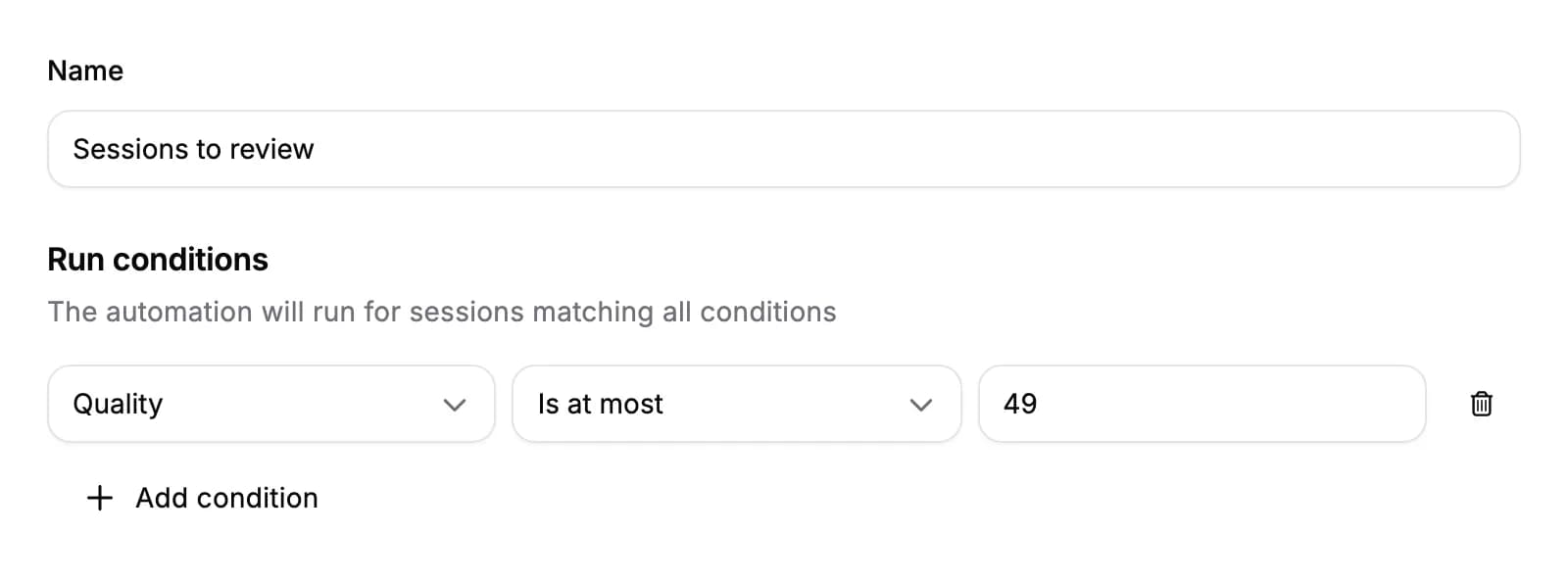
- Run on quality. Add a Quality run condition to run an automation only for sessions scoring at least, at most or between the scores you set, such as posting to Slack when a session scores 49 or less. Sessions without a score, such as ones where the visitor never typed or spoke, never match.
- In Slack. Slack session messages show the session's quality with its gauge, as in Handhold, next to the visitor's feedback and the highlight counts. Hover the gauge in Slack on desktop to see what lowered the score.
- In tickets and meeting notes. Jira tickets and the meetings logged in HubSpot and Pipedrive list the session's quality.
- Send it to your CRM or PostHog. In an automation's field mapping, map Quality (0–100) under Session to send the session's score, such as
50.
For AI agents: a clean Markdown version is available at /changelog/2026-11-13-run-automations-on-session-quality.md.