The weekly email now shows what to act on
· Artur Jürgenson
The email you get every Monday now covers last week for each organization you're in, and each section gives you something to do.
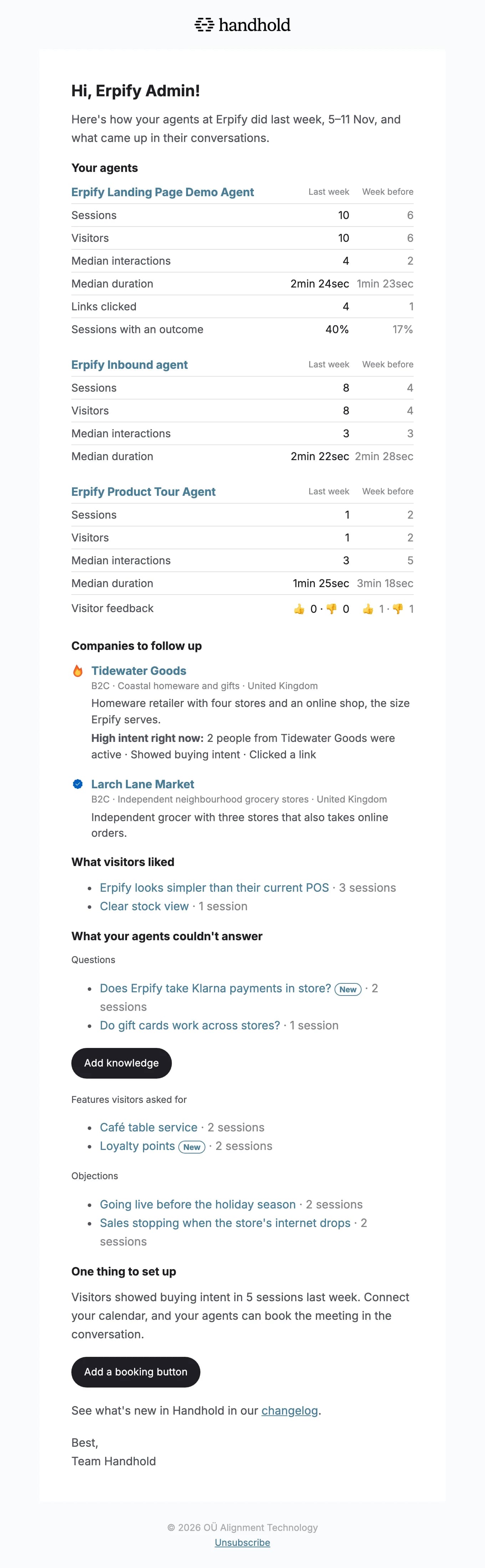
- Your agents. See how each agent did last week next to the week before: its sessions and visitors, the meetings, support requests, demos and link clicks they led to, and what visitors thought of it.
- Companies to follow up. Know who to reach out to: companies that fit your ideal customer profile and talked to your Demo or Inbound agents, high intent first, each with why it fits and a link to its visitor.
- What visitors liked and what your agents couldn't answer. Find what to add to your knowledge and what to pass on to your product team: praise, unanswered questions, features visitors asked for and concerns, grouped by topic, each linking to the latest session that raised it, with new topics marked.
- One thing to set up. When visitors showed buying intent and your agents can't book meetings yet, a pointer to adding a booking button.
You can turn the email off under Newsletter in your account settings.
For AI agents: a clean Markdown version is available at /changelog/2026-11-12-the-weekly-email-shows-what-to-act-on.md.