See how well your agent handled each session
· Sander Rõuk
Each session where the visitor wrote or spoke to your agent now gets a quality score from 0 to 100 (demo agent sessions from the visitor's third interaction), so you can see which sessions to review and whether your agent is getting better.
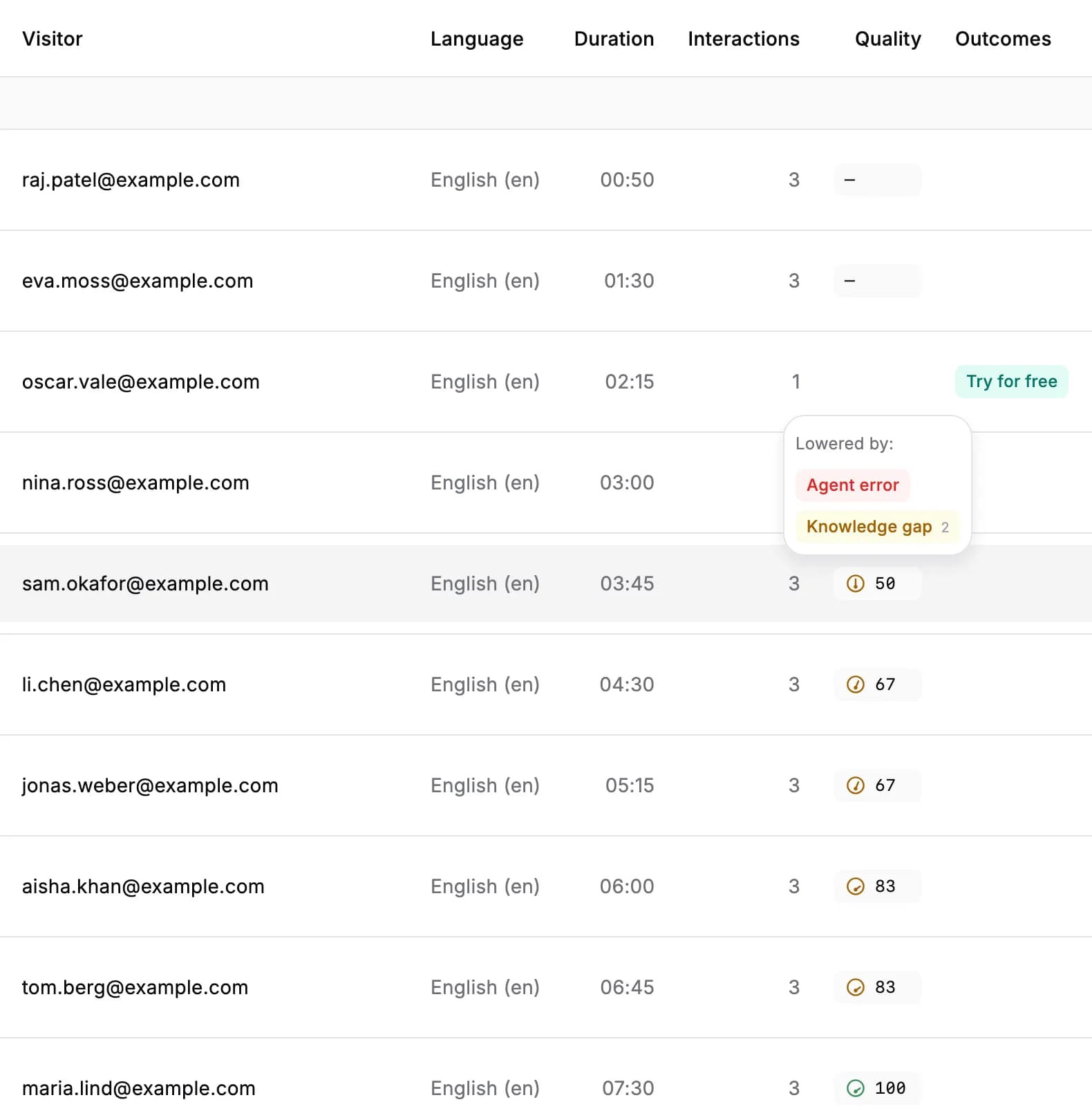
- How it's scored. A session starts at 100, and each agent error or knowledge gap in its highlights takes its share of the conversation: one in a ten-message conversation leaves 90. A short session that goes wrong scores lower than a long one with a single slip. Product gaps, intent, concerns and praise don't lower it.
- In your sessions lists and on each session. A Quality column shows each session's score, coloured from red to green, in your agent's sessions and on each visitor's page, and the session page shows it next to the interactions. Hover over it to see what lowered it.
- On your agent's overview. An Average quality card shows how your agent did in the period and how that compares with the period before. Use the Quality filter to list only the sessions in a score range, such as the ones below 50 to review first.
- In exports and MCP. The CSV export has a quality column, and the MCP tools return each session's score and the average, and can filter sessions by score.
Scores appear once a session has been analysed, shortly after it ends. Sessions from before 1 October have no score.
For AI agents: a clean Markdown version is available at /changelog/2026-11-05-session-quality.md.